How to Develop AI Applications: Guide 2026
_(1).jpg)
Have you noticed how apps today can instantly answer questions, recommend exactly what you need, or make smart decisions on their own?
That’s the power of Artificial Intelligence. AI is no longer just an experiment it has become an essential part of modern businesses. In 2026, companies use AI to improve how they work, how users interact with products, and how important decisions are made. From chatbots and product recommendations to data predictions and content creation, AI is now part of everyday digital tools.
In this guide, you’ll learn how to develop AI applications step by step in simple language with examples. Whether you’re a startup founder, business owner, or developer, this guide will help you understand the complete process of building an AI app with confidence.
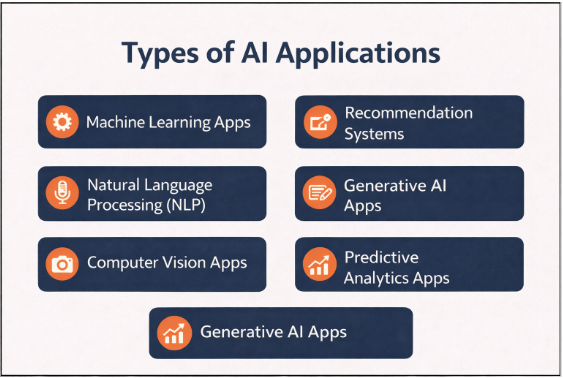
Types of AI Applications
Before starting development, it’s important to understand the type of AI application you want to build.
Common AI App Categories
- Machine Learning Apps -Predict outcomes using historical data
- Natural Language Processing (NLP) -Chatbots, voice assistants, text analysis
- Computer Vision Apps -Image and video recognition
- Recommendation Systems -Personalized suggestions
- Generative AI Apps -Content, image, and code generation
- Predictive Analytics Apps -Forecast trends and behaviors
Each type requires different tools, data, and expertise.
Step-by-Step Guide: How to Develop AI Applications
Here is a step-by-step guide on how to develop an AI app in detail, covering everything from idea validation and data preparation to deployment and continuous improvement.
Step 1: Identify the Problem and Define Goals
Every successful AI app starts with a clear problem. Before thinking about technology or tools, you must understand what you want to solve and why AI is the right choice.
Ask yourself:
- What problem am I solving?
- Who are the target users?
- Why does this problem need AI?
- What outcome do I expect?
AI should enhance your solution not complicate it.
Step 2: Choose the Right AI Use Case
Not every problem needs AI. Use AI only when it truly improves the solution or makes tasks smarter and faster.
Examples:
- Use machine learning for predictions
- Use NLP for customer support chatbots
- Use computer vision for face or object detection
- Use generative AI for content creation
Selecting the right use case helps reduce development time and cost.
Step 3: Data Collection and Preparation
Data is the foundation of every AI application. Without good data, even the best AI model will fail.
Data Activities
- Collect relevant and reliable data
- Remove duplicates and errors
- Label data correctly
- Normalize and structure datasets
High-quality data produces high-quality AI results.
Step 4: Select the Right Technology Stack
Your technology stack depends on your project size, budget, performance needs, and future growth plans.
Popular AI Development Tools
|
Category |
Tools |
|
Programming Languages |
Python, Java, JavaScript |
|
AI Frameworks |
TensorFlow, PyTorch, Keras |
|
NLP Libraries |
SpaCy, NLTK |
|
Computer Vision |
OpenCV |
|
Cloud Platforms |
AWS, Google Cloud, Azure |
|
Databases |
PostgreSQL, MongoDB |
|
AI APIs |
OpenAI, Google AI APIs |
Choosing the right tools ensures smooth development and future scalability.
Step 5: Build and Train the AI Model
This is the stage where your application becomes intelligent.
The model development process usually includes:
- Select an algorithm
- Train the model with prepared data
- Test accuracy and performance
- Fine-tune parameters
- Validate results with test data
This step may require multiple iterations to achieve reliable results.
Step 6: Integrate AI Into the Application
Once your model is ready, integrate it into the application.
Integration methods include:
- AI models hosted on cloud servers
- AI accessed via APIs
- On-device AI for mobile apps
Make sure AI processing does not slow down the user experience.
Step 7: Design a User-Friendly Interface
AI should feel simple and natural to users.
Best UI/UX practices:
- Keep interfaces clean and intuitive
- Explain AI actions clearly
- Avoid overwhelming users with technical details
- Show results in a meaningful way
Good design builds trust and improves adoption.
Step 8: Test the AI Application Thoroughly
AI applications must be tested carefully because their behavior can change over time.
Testing Areas
- Functional testing
- AI accuracy testing
- Performance testing
- Security testing
- Bias and fairness testing
- Privacy compliance testing
Testing ensures your AI app is reliable and ethical.
Step 9: Deploy and Launch
After testing, deploy the application.
Deployment considerations:
- Choose cloud or on-premise hosting
- Set up monitoring tools
- Ensure data security
- Prepare rollback plans
Launch gradually to monitor performance and user feedback.
Step 10: Monitor, Improve, and Scale
AI apps require continuous improvement.
Post-launch activities:
- Monitor AI behavior
- Collect user feedback
- Retrain models with new data
- Add new features
- Optimize performance
AI development is an ongoing process, not a one-time task.
Common Challenges and Solutions
This section explains common problems in AI app development and how to solve them.
|
Challenge |
Solution |
|
Poor data quality |
Clean and validate datasets |
|
High development cost |
Start with MVP |
|
Model bias |
Test with diverse data |
|
Slow performance |
Optimize models and infrastructure |
|
User trust issues |
Provide explanations and transparency |
Planning helps overcome these challenges efficiently.
Conclusion
How to Develop AI Applications in 2026 is not just about technology, it’s about creating smarter solutions for real problems.
By following a structured development process, choosing the right tools, and focusing on user experience, you can build AI applications that are powerful, scalable, and impactful.
Frequently Asked Questions
-

Krishna Handge
WOWinfotechJan 12,2026