A Complete E-Commerce Website Checklist to Launch an Online Store
.jpg)
Planning to build an e-Commerce website in 2026? You’re on the right path to growing your business online. As digital shopping keeps expanding, customers now expect smooth, fast, and secure buying experiences. A clear e-Commerce checklist helps you plan your store step by step and avoid missing important elements during development.
Without proper planning, an online store can end up with poor design, missing features, and a confusing user journey. From product pages to checkout, every part of your e-Commerce website needs to be structured carefully. A checklist ensures your store is user-friendly, functional, and ready to handle real customers from day one.
This e-Commerce checklist for 2026 gives you a simple guide to build your online store the right way. It covers everything from essential pages and features to payments, security, costing, and marketing so you can launch with confidence.
Pre-Launch Planning for E-Commerce Website
Pre-launch planning sets the foundation for a successful e-commerce website. It helps define clear goals, understand the audience, and structure product offerings strategically. Proper planning reduces errors during development and ensures the store is aligned with business objectives and market demand.
Business Goals and Target Audience
Define what the e-commerce website aims to achieve and who it is built for. Clear goals guide design, features, and marketing direction.
- Set revenue and sales targets
- Identify primary and secondary customer segments
- Understand customer behavior and buying intent
- Decide brand positioning and value proposition
- Choose B2C, B2B, or hybrid model
Product Selection and Catalog Planning
Select products carefully and organize them into a structured catalog for better navigation and conversions.
- Finalize product range based on demand and profitability
- Group products into logical categories
- Prepare product descriptions, images, and pricing
- Plan inventory management approach
- Decide on variations like size, color, or bundles
Competitor Research
Analyze competitors to understand market trends, pricing strategies, and user expectations.
- Identify direct and indirect competitors
- Study their website design and user experience
- Compare pricing, offers, and product range
- Analyze marketing strategies and SEO performance
- Identify gaps and opportunities for differentiation
Essential Pages for an E-Commerce Website
An effective E-Commerce Website depends on well-structured pages that guide users smoothly from browsing to purchase. A clear E-Commerce Checklist ensures every important page is included to improve usability, trust, and conversions.
Home Page
The home page creates the first impression and directs users to key sections of the store.
- Highlights best-selling and featured products
- Displays offers, banners, and categories
- Builds brand identity and trust
Product Listing Page (Category Page)
This page helps users browse products within specific categories easily.
- Filters products by price, brand, and features
- Improves product discoverability
- Enhances shopping experience with quick navigation
Product Detail Page
Provides complete product information to help users make buying decisions.
- Shows images, descriptions, and specifications
- Displays pricing, availability, and reviews
- Includes “Add to Cart” and wishlist options
Cart Page
Allows users to review selected items before checkout.
- Shows product summary and quantities
- Enables editing or removing items
- Calculates total price and discounts
Checkout Page
Final step in completing a purchase securely and quickly.
- Collects shipping and billing details
- Supports multiple payment options
- Ensures smooth and fast order completion
Login/Register Page
Helps users create accounts for a personalized experience.
- Stores order history and preferences
- Enables faster checkout process
- Supports account recovery options
About Us Page
Builds trust by sharing brand story and mission.
- Explains business background and values
- Strengthens customer confidence
- Highlights uniqueness of the brand
Contact Page
Provides a way for customers to reach support easily.
- Includes email, phone, and contact form
- Helps resolve customer queries
- Improves customer satisfaction
FAQ Page
Answers common customer questions quickly.
- Reduces support workload
- Clarifies shipping, returns, and payments
- Improves user experience
Policies Page
Ensures transparency and legal compliance for the store.
- Defines return and refund rules
- Explains shipping timelines and charges
- Builds trust and protects business legally
Ideal Layout Structure of E-Commerce Pages
A well-planned layout is essential for building a successful E-Commerce Website. It improves user experience, guides customers smoothly through the buying journey, and directly impacts conversions. Every page must be designed with clarity, functionality, and ease of navigation in mind.
Home Page Layout
The Home Page creates the first impression and guides users to key sections of the store.
- Clear navigation menu with product categories
- Featured products, offers, and banners
- Search bar for quick product discovery

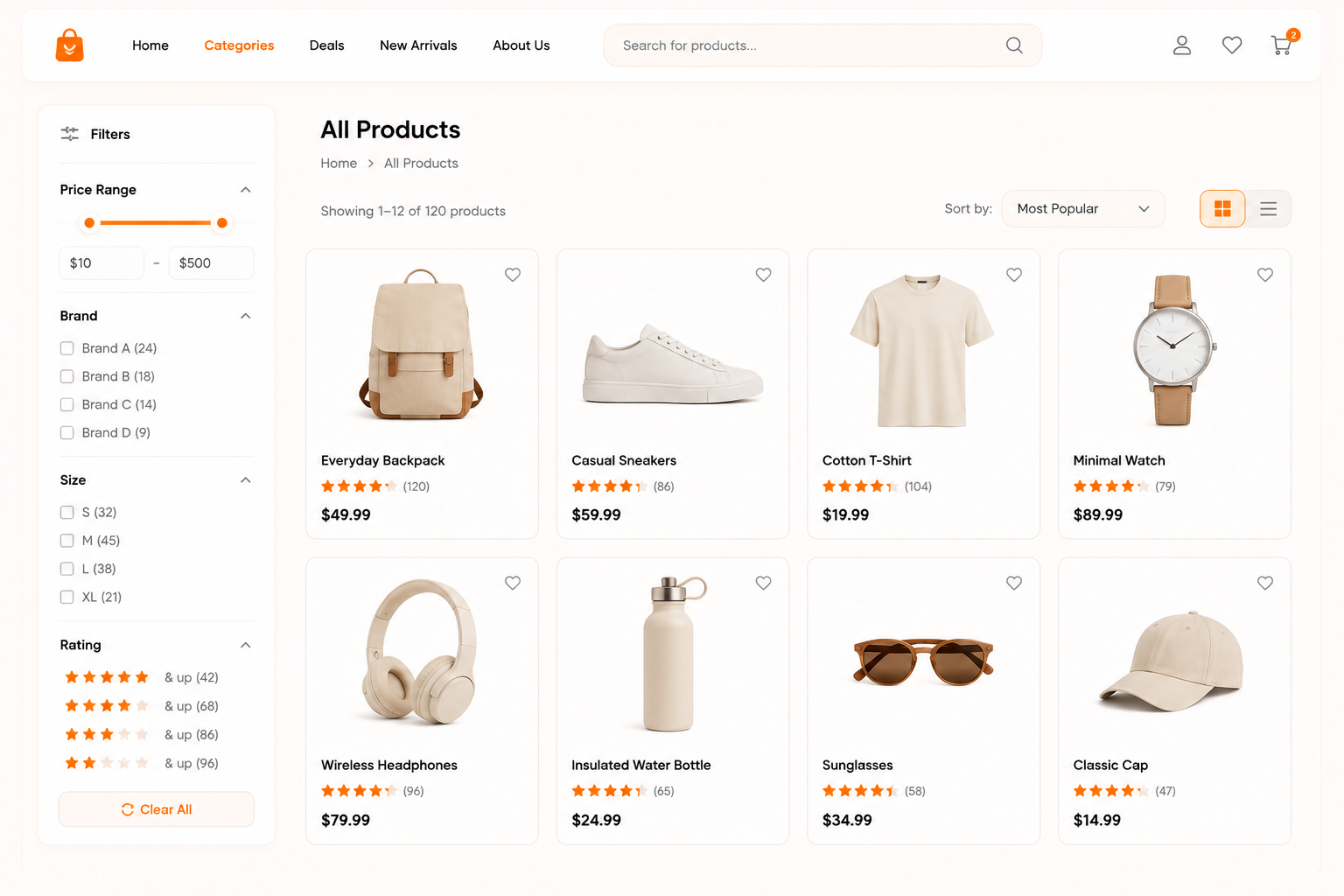
Product Listing Page Layout
This page helps users browse products within a specific category in an organized way.
- Filters for price, brand, size, or rating
- Sort options like popularity and price
- Grid or list view for easy comparison
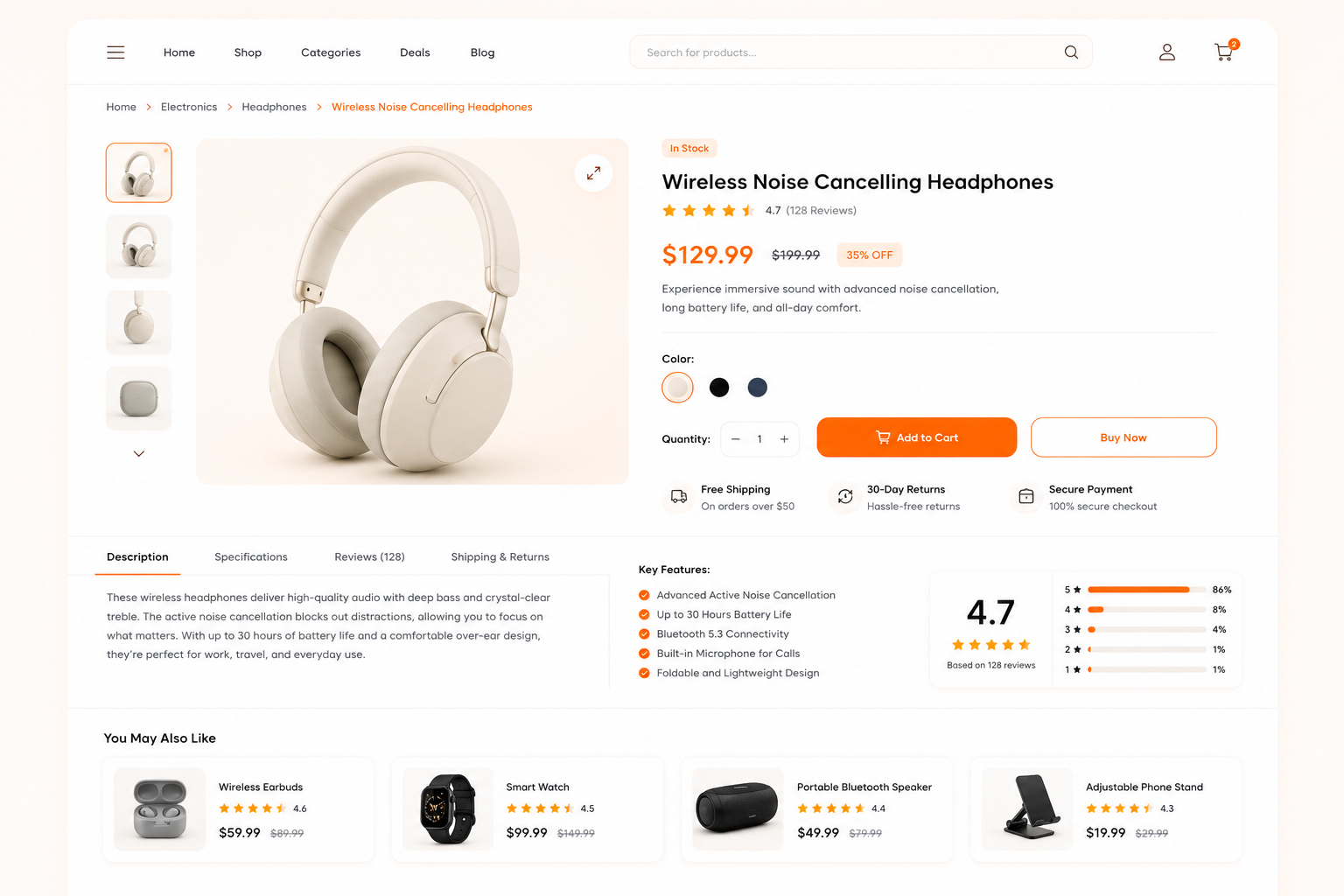
Product Detail Page Layout
The Product Detail Page provides complete product information to help purchase decisions.
- High-quality images and zoom feature
- Detailed description, specs, and pricing
- Reviews, ratings, and related products
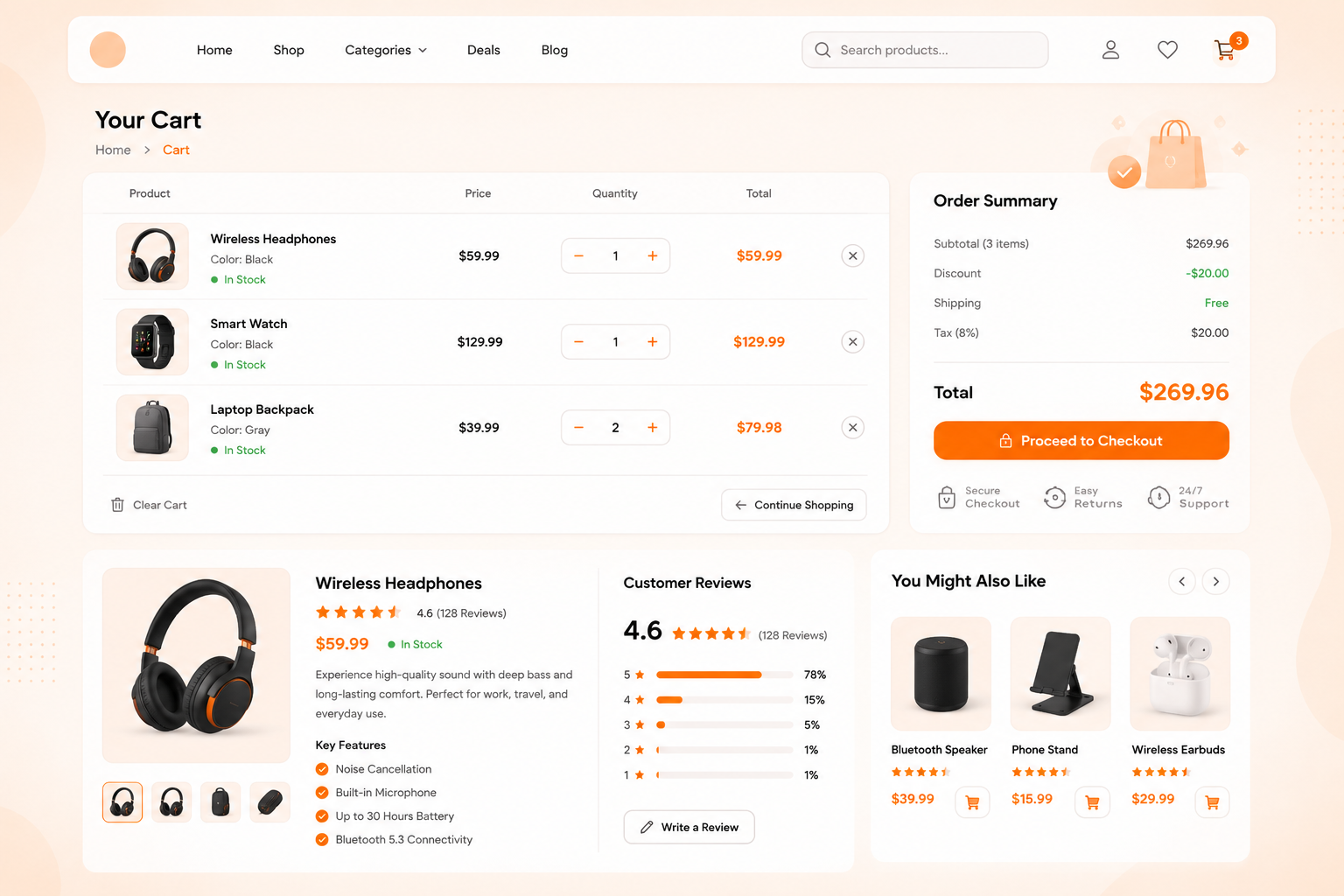
Cart Page Layout
The Cart Page allows users to review selected items before checkout.
- Product summary with quantity update option
- Price breakdown including taxes and discounts
- Easy “Proceed to Checkout” button
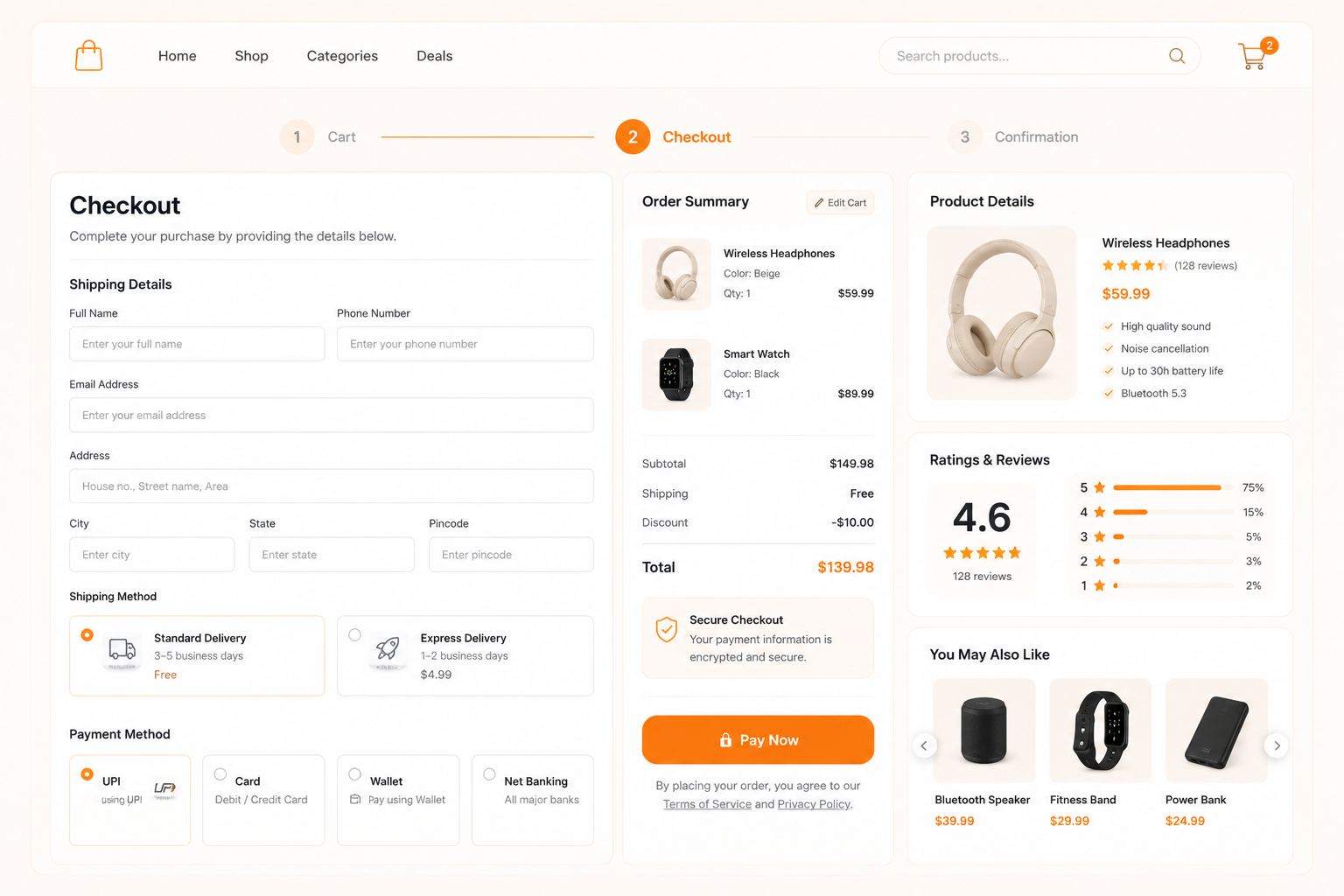
Checkout Page Layout
This is the final step where users complete their purchase securely.
- Multiple payment options (UPI, cards, wallets)
- Address and shipping details form
- Order summary before payment confirmation
Login/Register Page Layout
This page manages user accounts and improves personalization.
- Quick registration and login options
- Social login integration (Google, email)
- Order history and saved addresses access
A structured E-Commerce Checklist ensures every page of your E-Commerce Website is optimized for usability, conversions, and smooth customer journeys.
Top 20 Essential E-Commerce Website Features
A successful e-commerce website depends on features that improve user experience, speed, trust, and conversions. These features help customers browse easily, make secure purchases, and return for repeat buying, while also helping businesses manage operations efficiently and scale online growth.
1. Mobile Responsive Design
Website should adapt to all screen sizes for smooth mobile shopping.
- Works on mobile, tablet, and desktop
- Improves user experience
- Boosts conversions
2. Fast Website Speed
Quick-loading pages reduce bounce rates and improve sales.
- Page load time under 3 seconds
- Optimized images
- Better SEO rankings
3. Secure Checkout
Ensures safe transactions and builds customer trust.
- SSL encryption
- Secure payment gateways
- Fraud protection
4. Smart Search
Helps users find products quickly using intelligent search.
- Auto-suggestions
- Typo correction
- Faster product discovery
5. Product Filters
Allows users to easily refine search results.
- Filter by price, size, and brand
- Improves shopping experience
- Reduces search time
6. Easy Navigation
Simple menu structure improves browsing flow.
- Clear categories
- Sticky menu
- User-friendly structure
7. High-Quality Product Images
Clear visuals increase purchase confidence.
- Zoom feature
- Multiple product angles
- High-resolution images
8. Detailed Product Pages
Provides complete product information for decision-making.
- Specifications and features
- Pricing and availability
- Clear product descriptions
9. Customer Reviews & Ratings
Builds trust through social proof.
- Verified reviews
- Star ratings
- User feedback display
10. Shopping Cart
Stores selected items for checkout.
- Save products
- Edit quantities
- Easy access
11. One-Page Checkout
Simplifies the purchase process and reduces cart abandonment.
- Minimal steps
- Faster checkout
- Higher conversion rates
12. Multiple Payment Options
Offers flexibility for different users.
- UPI, cards, and net banking
- Wallet integration
- Cash on Delivery (COD)
13. Wishlist
Allows users to save products for future purchases.
- Save favorite products
- Track discounts
- Improves customer retention
14. Order Tracking
Helps customers track delivery status.
- Real-time updates
- SMS and email alerts
- Shipment visibility
15. Inventory Management
Keeps stock information updated in real time.
- Stock tracking
- Low inventory alerts
- Automated updates
16. AI Product Recommendations
Suggests relevant products to increase sales.
- Personalized recommendations
- Based on browsing history
- Boosts upselling opportunities
17. Live Chat Support
Provides instant customer assistance.
- 24/7 support
- Chatbots or live agents
- Quick issue resolution
18. SEO Optimization
Improves visibility on search engines.
- Optimized product pages
- Meta tags and keywords
- Better search rankings
19. Analytics & Reporting
Tracks user behavior and sales performance.
- Traffic insights
- Conversion tracking
- Sales reports
20. Loyalty & Rewards Program
Encourages repeat purchases through incentives.
- Points-based rewards system
- Discount incentives
- Improves customer retention and loyalty
Payment Gateway Options for E-Commerce
A reliable payment system is essential for any e-commerce website to ensure smooth, secure, and convenient transactions. Offering multiple payment methods improves customer trust, reduces cart abandonment, and increases overall conversions for online stores.
Credit/Debit Cards
Card payments are one of the most widely used online payment methods, allowing customers to pay instantly using Visa, Mastercard, or other bank cards.
- Fast and secure transaction processing
- Supports international payments
- Easy integration with most gateways
UPI Payments
UPI has become a dominant payment method in India, enabling instant bank-to-bank transfers through mobile apps.
- Real-time payment confirmation
- Highly preferred for mobile users
- Works with apps like Google Pay, PhonePe, and Paytm
Net Banking
Net banking allows customers to directly pay from their bank accounts through secure online banking portals.
- High trust and security from banks
- Suitable for large transaction values
- No need for card details
Wallets
Digital wallets store money digitally and allow quick checkout without entering payment details every time.
- Faster checkout experience
- Rewards and cashback options
- Easy integration with mobile apps
Cash on Delivery (COD)
COD allows customers to pay when the product is delivered, increasing trust among first-time buyers.
- Builds confidence for new users
- Reduces hesitation in online shopping
- Popular in tier 2 and tier 3 cities
Popular Payment Gateway Integration Options
Popular payment gateways like Razorpay, PayU, Stripe, PayPal, and Cashfree provide secure and scalable payment solutions. They support multiple payment methods such as cards, UPI, wallets, and net banking, along with fraud protection, easy integration, and fast settlement for e-commerce businesses.,
Security Features for Online Stores
Security is a critical part of any e-commerce website as it protects customer data, payment details, and builds trust. A secure store reduces fraud risks and ensures safe transactions, which directly improves conversions and brand credibility.
SSL Certification
SSL (Secure Socket Layer) encrypts data between the user and website, ensuring safe browsing and transactions.
- Protects sensitive customer information
- Builds trust with browser HTTPS display
- Improves SEO rankings
Data Encryption
Data encryption converts information into secure code during storage and transfer.
- Secures personal and payment data
- Prevents unauthorized access
- Protects backend databases
Secure Payment Processing
Ensures all online transactions are handled through safe and verified channels.
- PCI-DSS compliant systems
- Secure checkout experience
- Reduces payment failures and fraud
Fraud Detection Systems
Monitors and blocks suspicious activities in real time.
- Detects fake transactions
- Flags unusual user behavior
- Prevents chargeback losses
E-Commerce Website Development Costing
E-commerce website development cost depends on features, design complexity, platform choice, and integrations. A simple store costs less, while advanced platforms with custom features, scalability, and automation require higher investment for development, security, and long-term maintenance.
E-Commerce Website Cost
|
Cost Component |
Description |
Estimated Cost (INR) |
|
Domain & Hosting |
Website address and server hosting |
₹1,000 – ₹10,000/year |
|
UI/UX Design |
Layout, user experience, and branding |
₹15,000 – ₹1,00,000 |
|
Development |
Frontend + backend coding |
₹30,000 – ₹3,00,000+ |
|
E-commerce Features |
Cart, checkout, filters, etc. |
₹20,000 – ₹1,50,000 |
|
Payment Integration |
Gateway setup and configuration |
₹5,000 – ₹25,000 |
|
Security Setup |
SSL, firewall, data protection |
₹3,000 – ₹20,000 |
|
Maintenance |
Updates, bug fixes, support |
₹5,000 – ₹50,000/month |
Custom Development vs Templates
Custom development offers full flexibility, scalability, and unique branding but comes at a higher cost. Template-based solutions are affordable and faster to launch but have limited customization and scalability options for growing businesses.
Factors Affecting Pricing
Pricing depends on product range, design complexity, number of features, third-party integrations, performance requirements, and scalability needs. Advanced functionalities like AI recommendations or ERP integration significantly increase overall development cost.
Maintenance and Recurring Costs
Ongoing expenses include hosting renewal, plugin updates, security monitoring, technical support, and performance optimization. Regular maintenance ensures smooth performance and prevents downtime or security issues.
Technology Stack for E-Commerce Development
A strong technology stack is the foundation of a scalable e-commerce website. It ensures smooth performance, faster loading speed, secure transactions, and better user experience across devices. Choosing the right combination of frontend, backend, CMS, and hosting helps build a reliable online store.
|
Layer |
Options |
Purpose |
|
Frontend Technologies |
HTML, CSS, JavaScript, React, Angular, Vue.js |
Handles UI, design, and user interactions for a smooth shopping experience |
|
Backend Frameworks |
Node.js, Laravel, Django, Ruby on Rails |
Manages server logic, database operations, authentication, and order processing |
|
CMS Platforms |
Shopify, WooCommerce, Magento |
Provides ready-made e-commerce features like product management, payments, and inventory control |
|
Hosting & Servers |
AWS, Google Cloud, DigitalOcean, Bluehost |
Ensures website speed, uptime, security, and scalability for growing traffic |
SEO for E-Commerce Website
Search Engine Optimization plays a key role in making an e-commerce website visible, discoverable, and profitable. A strong SEO setup ensures your store ranks higher on search engines, attracts qualified traffic, and improves product visibility across competitive online markets.
On-page SEO Checklist
On-page SEO ensures every page is optimized for search engines and users. It improves relevance, ranking, and click-through rates.
- Use keyword-rich titles and meta descriptions
- Optimize headings (H1, H2, H3 structure)
- Add internal linking between product and category pages
- Optimize images with alt text and compressed size
- Ensure fast page loading speed and mobile responsiveness
Product Page Optimization
Product pages are the core of any e-commerce website and must be highly optimized to convert visitors into buyers.
- Write unique product descriptions (avoid duplicate content)
- Use clear product titles with targeted keywords
- Add high-quality images and videos
- Include customer reviews and ratings
- Highlight product benefits, specifications, and FAQs
URL Structure
Clean and structured URLs help search engines understand page content and improve indexing.
- Keep URLs short and readable
- Use keywords in URLs (e.g., /mens-shoes/sports-shoes)
- Avoid unnecessary numbers and symbols
- Maintain consistent structure across the website
- Use hyphens instead of underscores
Schema Markup
Schema markup improves how search engines display your products in results with rich snippets.
- Add product schema for price, availability, and ratings
- Use breadcrumb schema for navigation clarity
- Implement review schema for star ratings in search results
- Add organization schema for brand visibility
- Use FAQ schema for better SERP coverage
Conclusion
Launching an e-commerce website requires more than just listing products online. Success depends on careful planning, the right features, secure payment options, effective SEO, and a clear marketing strategy that supports long-term business growth.
By following this e-commerce checklist, businesses can create a user-friendly online store that delivers a smooth shopping experience while building trust and increasing conversions. Every element, from website structure to security and optimization, contributes to overall performance.
Whether you are starting a new online store or upgrading an existing one, this checklist provides a practical roadmap for a successful launch. Use it to plan, develop, and grow an e-commerce website that is ready to compete in today's digital marketplace.
Need expert help building or optimizing your online store? WOWinfotech specializes in e-commerce website development, custom solutions, and SEO-driven strategies to help businesses create high-performing online stores. Contact our team today to turn your e-commerce vision into a successful and scalable business.
FAQ
-

Krishna Handge
WOWinfotechJun 08,2026