
Low Code Platforms for App Development and its Benefits
_(1).jpg)
Low-code platforms have changed the way businesses build software applications. Instead of writing thousands of lines of code, developers use visual interfaces, drag-and-drop components, reusable templates, and automated workflows to create web, mobile, and enterprise applications faster.
In 2026, low-code is no longer limited to small business tools. Large enterprises, government organizations, healthcare providers, financial institutions, retailers, and manufacturers use low-code platforms to accelerate digital transformation, automate workflows, modernize legacy systems, and improve customer experiences.
This guide explains everything you need to know about low-code platforms, including how they work, their benefits, differences from no-code platforms, and why they have become an important part of modern software development.
What is Low-Code App Platforms?
A low-code app platform is a development platform that lets users build applications using visual tools, drag-and-drop components, and minimal coding, making app development faster and easier.
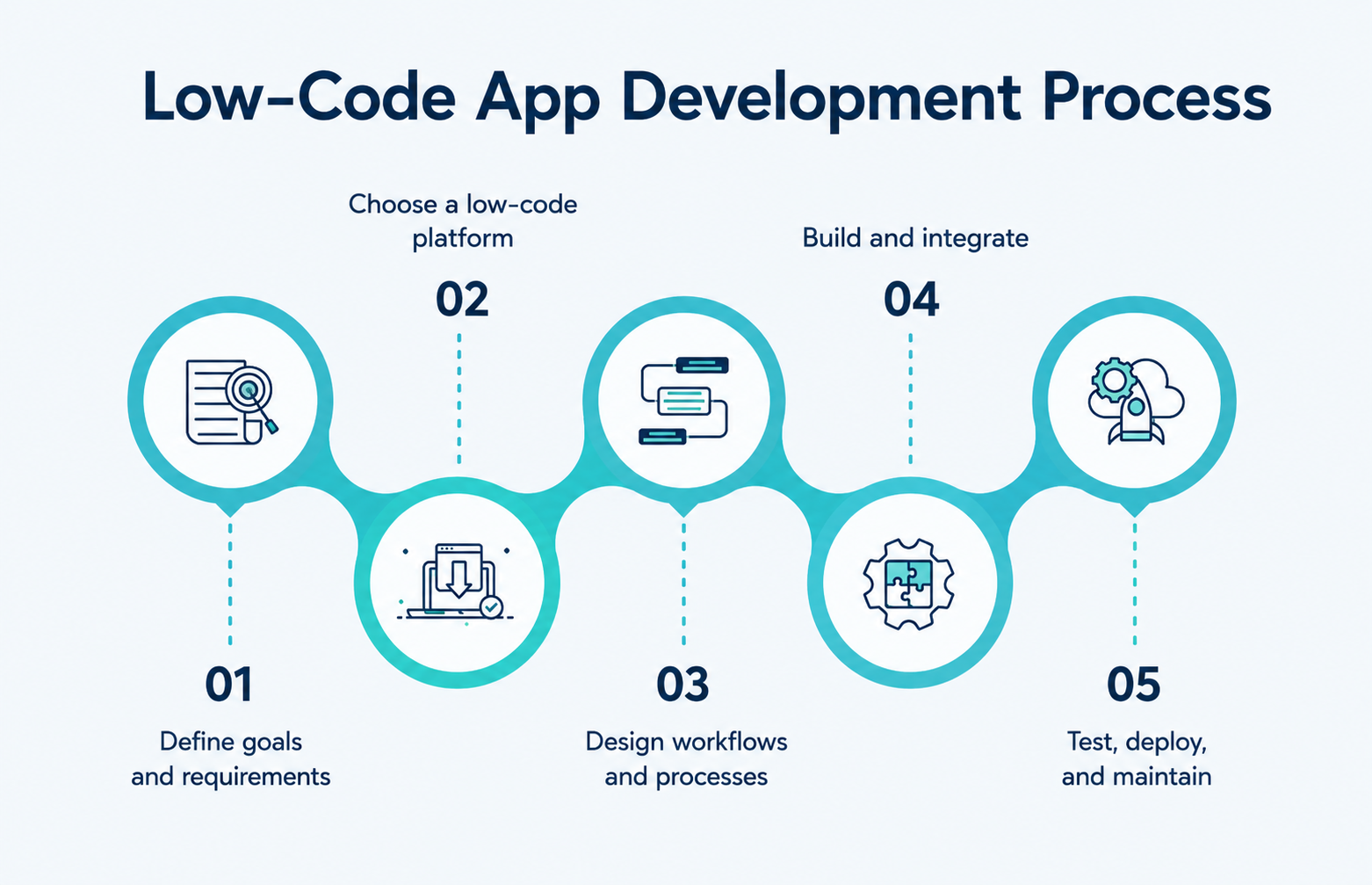
How Low-Code Platforms Work
Although each platform has its own features, most low-code platforms follow a similar development process.
Step 1: Visual Application Design
Developers create the app interface using drag-and-drop components instead of writing code.
These components may include:
- Buttons
- Forms
- Tables
- Charts
- Navigation menus
- Dashboards
- Data grids
- Input fields
Instead of manually writing HTML, CSS, or JavaScript for every screen, developers assemble the interface visually.
Step 2: Business Logic
Business rules define how the application behaves using visual workflow builders.
Examples include:
- Employee leave approval
- Invoice processing
- Order tracking
- Customer registration
- User authentication
- Notification workflows
Most platforms use visual workflow builders to define these rules.
Step 3: Database Integration
The platform connects the application with databases, APIs, and enterprise systems to manage data.
Low-code platforms connect with:
- SQL databases
- Cloud databases
- Enterprise databases
- APIs
- CRM systems
- ERP software
- Spreadsheets
- Third-party services
Many platforms automatically generate database models based on the application's structure.
Step 4: Automation
Repetitive tasks like approvals, notifications, and onboarding are automated to improve efficiency.
Businesses can automate repetitive processes such as:
- Email notifications
- Invoice approvals
- Purchase requests
- Employee onboarding
- Customer support tickets
- Payment reminders
Automation reduces manual work and improves operational efficiency.
Step 5: Deployment
Applications are deployed to web, mobile, cloud, or enterprise environments with minimal manual effort.
Once testing is complete, applications can be deployed to:
- Web browsers
- Android devices
- iOS devices
- Cloud environments
- Private servers
- Enterprise infrastructure
Many low-code platforms also support one-click deployment, simplifying the release process.
Low-Code vs No-Code vs Traditional Development
Choosing the right development approach depends on project complexity, customization needs, technical expertise, and long-term maintenance.
|
Feature |
Low-Code |
No-Code |
Traditional Development |
|
Coding Required |
Some |
None |
Extensive |
|
Target Users |
Developers & Business Teams |
Business Users |
Professional Developers |
|
Flexibility |
High |
Limited |
Very High |
|
Customization |
Extensive |
Basic |
Unlimited |
|
Development Speed |
Fast |
Very Fast |
Slower |
|
Scalability |
High |
Moderate |
High |
|
Enterprise Support |
Excellent |
Limited |
Excellent |
|
Integration Options |
Extensive |
Moderate |
Unlimited |
When Should You Use Low-Code?
Low-code is suitable when:
- You need enterprise-grade applications.
- Your project requires integrations with existing systems.
- Some custom coding is necessary.
- You want faster delivery without sacrificing flexibility.
- The application is expected to scale over time.
When Is No-Code a Better Choice?
No-code works well for:
- Simple internal tools
- Personal projects
- Basic workflows
- Small business applications
- Rapid prototypes
When Is Traditional Development the Best Option?
Traditional development is ideal for:
- Highly specialized software
- Complex algorithms
- Performance-critical systems
- Custom platforms with unique requirements
- Applications requiring complete control over architecture
Why Businesses Are Choosing Low-Code Platforms
Organizations across industries are adopting low-code because it addresses several common business challenges.
Faster Digital Transformation
Speeds up modernization and automation by reducing development time for digital solutions.
- Faster app delivery
- Quick process automation
- Improved customer experience
Addressing Developer Shortages
Helps teams build more applications even with limited developer resources.
- Higher productivity per team
- Reduced hiring pressure
- Faster project completion
Modernizing Legacy Systems
Updates or integrates old systems without full replacement.
- Connects old and new systems
- Reduces migration risk
- Improves system performance
Improving Collaboration
Bridges the gap between business users and developers in application building.
- Shared understanding of requirements
- Faster feedback cycles
- Better business alignment
Top Benefits of Low-Code Platforms for App Development
Low-code platforms help organizations build applications faster with less coding while improving productivity, scalability, and collaboration.
1. Better Collaboration Between Business and IT
Improves communication between technical teams and business users using visual tools and workflows.
- Reduces misunderstandings
- Speeds up feedback cycles
- Aligns apps with business needs
2. Easier Maintenance and Updates
Simplifies updates by using reusable components and centralized logic.
- Faster bug fixes
- Lower maintenance effort
- Easier feature updates
3. Improved Scalability
Supports large-scale applications when built with proper architecture and cloud infrastructure.
- Handles growing user demand
- Works with cloud systems
- Supports enterprise workloads
4. Strong Integration Capabilities
Connects easily with existing business systems and third-party tools.
- CRM, ERP, and HR systems
- APIs and cloud services
- Databases and business tools
5. Built-in Security Features
Provides enterprise-level security tools to protect data and access.
- Role-based access control
- Data encryption and MFA
- Audit logs and compliance support
6. Cross-Platform Development
Allows one application to run across web, mobile, and other platforms.
- Consistent user experience
- Faster deployment
- Reduced development effort
7. AI-Assisted Development
Uses AI to speed up development and reduce manual work.
- Auto-generates UI and workflows
- Suggests logic and fixes
- Improves productivity and accuracy
Best Low-Code Platforms for App Development in 2026
The low-code market has grown rapidly, with several platforms offering enterprise-grade capabilities. Choosing the right platform depends on business requirements, integration needs, scalability, and development experience.
1. OutSystems
OutSystems is widely used for enterprise application development. It offers visual development tools, AI-assisted features, extensive integration capabilities, and support for large-scale applications.
Starting Price (Approx.) - Custom Pricing (Typically starts from ₹1.5–₹3 lakh/month for enterprise plans)
Key strengths:
- Enterprise-grade architecture
- Strong DevOps support
- Cloud and on-premises deployment
- Advanced security features
- Extensive integration options
Best for:
- Large enterprises
- Government organizations
- Financial institutions
- Healthcare providers
2. Microsoft Power Apps
Power Apps is part of the Microsoft Power Platform and integrates closely with Microsoft 365, Azure, Dynamics 365, and other Microsoft services.
Starting Price (Approx.) - ₹1,700–₹2,000/user/month (Premium Plan)
Key strengths:
- Easy Microsoft ecosystem integration
- Built-in connectors
- AI Builder
- Workflow automation
- Rapid internal application development
Best for:
- Organizations using Microsoft technologies
- Internal business applications
- Workflow automation
3. Mendix
Mendix focuses on enterprise application development with strong collaboration features, cloud deployment, and AI-assisted development.
Starting Price (Approx.) - Custom Pricing (Starts around ₹4–₹8 lakh/year)
Key strengths:
- Agile development support
- Multi-cloud deployment
- Reusable components
- Strong collaboration tools
Best for:
- Enterprise digital transformation
- Manufacturing
- Logistics
- Large organizations
4. Salesforce Platform
Organizations already using Salesforce can build custom applications through its low-code development environment.
Starting Price (Approx.) - From ₹2,100/user/month (Starter)
Key strengths:
- CRM integration
- Customer data management
- Business automation
- Workflow development
Best for:
- Sales teams
- Customer service
- Marketing applications
5. Appian
Appian combines low-code development with business process automation (BPA) and case management.
Starting Price (Approx.) - Custom Pricing (Typically starts from ₹6–₹10 lakh/year)
Key strengths:
- Workflow automation
- Process mining
- AI integration
- Enterprise security
Best for:
- Process-intensive industries
- Financial services
- Government agencies
Industries Using Low-Code Platforms
Low-code platforms are used across nearly every industry because they reduce development time and improve operational efficiency.
|
Industry |
Common Low-Code Applications |
|
Healthcare |
Patient portals, appointment scheduling, electronic health records (EHR), staff management, medical inventory systems |
|
Banking & Finance |
Loan processing, customer onboarding, fraud detection, compliance workflows, digital banking apps |
|
Retail & E-commerce |
Inventory management, order processing, customer loyalty programs, warehouse management, support portals |
|
Manufacturing |
Production monitoring, quality control, equipment maintenance, asset tracking, supply chain management |
|
Government |
Citizen service portals, permit management, document approvals, complaint tracking, workflow automation |
|
Education |
Student enrollment, attendance tracking, learning management systems (LMS), examination portals, faculty management |
|
Insurance |
Claims processing, policy management, customer self-service portals, document automation |
|
Logistics & Transportation |
Fleet management, shipment tracking, warehouse operations, route planning, delivery management |
|
Human Resources (HR) |
Employee onboarding, leave management, payroll workflows, performance tracking, HR self-service portals |
|
Telecommunications |
Customer service portals, service request management, network monitoring dashboards, billing workflows |
Common Challenges of Low-Code Platforms
While low-code platforms offer many benefits, they also have some limitations that businesses should consider before choosing a platform.
1. Limited Customization
Highly complex applications may require custom coding, making traditional development a better option for advanced use cases.
2. Vendor Lock-in
Moving applications between low-code platforms can be challenging due to platform-specific tools and architecture. Choose a platform with long-term support.
3. Licensing Costs
Enterprise low-code platforms often have subscription-based pricing. Evaluate the total cost of ownership, including licensing and maintenance.
4. Performance Limitations
Applications with heavy workloads or complex processing may need additional optimization to ensure the best performance.
5. Governance and Security
Without proper governance, organizations may face security risks and unmanaged applications. Establish clear policies for access control, compliance, documentation, and development standards.
Common Myths About Low-Code Platforms
Many common myths about low-code platforms can create confusion. Let's separate the facts from the misconceptions.
Myth 1: Low-Code Is Only for Small Businesses
Reality:
Large enterprises, government agencies, banks, manufacturers, and healthcare organizations use low-code platforms to build enterprise-grade applications.
Many platforms support thousands of users, complex integrations, and mission-critical workloads.
Myth 2: Low-Code Replaces Software Developers
Reality:
Professional developers remain essential.
Low-code reduces repetitive coding but still requires expertise in:
- Software architecture
- Security
- Performance optimization
- API development
- Database design
- Integration
- DevOps
It changes the way developers work rather than replacing them.
Myth 3: Low-Code Applications Are Not Secure
Reality:
Security depends on both the platform and the organization implementing it.
Enterprise platforms provide:
- Encryption
- Authentication
- Role-based permissions
- Audit logs
- Compliance features
Organizations must still follow secure coding practices and governance standards.
Myth 4: Low-Code Cannot Scale
Reality:
Enterprise low-code platforms are designed to support high-performance applications when deployed using appropriate architecture and infrastructure.
Scalability depends on application design, database optimization, infrastructure, and operational practices not solely on the development approach.
Myth 5: Low-Code Is the Same as No-Code
Reality:
Although both simplify development, they serve different audiences.
Low-code allows developers to extend applications with custom code and supports more complex enterprise scenarios.
No-code focuses on users with little or no programming experience and is best suited for simpler applications.
Takeaways
- Low-code platforms reduce the amount of manual coding required to build applications.
- They improve development speed without eliminating the role of professional developers.
- Modern platforms support enterprise applications, cloud deployment, AI-assisted development, workflow automation, and system integration.
- Businesses across industries use low-code to accelerate digital transformation and improve operational efficiency.
- Success depends on selecting the right platform, establishing governance, and following software development best practices.
Frequently Asked Questions
No-code is designed for non-technical users and relies almost entirely on visual development tools.
- Healthcare
- Banking
- Insurance
- Retail
- Manufacturing
- Education
- Government
- Logistics
- Telecommunications
-

Team WOWinfotech
WOWinfotechJul 21,2023