AI-Powered Development Security: A Practical 2026 Guide
.jpg)
AI is changing the way businesses build and improve software. From writing code to testing applications and identifying security issues, AI can help development teams work faster while improving security throughout the software development lifecycle.
But using AI also brings new challenges. AI-generated code may contain security weaknesses, sensitive business information can be exposed, and AI-powered applications can introduce new risks if they are not properly managed. This makes security an important part of any organization’s AI strategy.
In this article, we explore AI-powered development security, why it matters, how businesses can use AI to improve software security, common use cases and risks, and practical ways to build security into AI-assisted software development. We’ll also look at how organizations can adopt AI while keeping their people, data, and applications protected.
What is AI-Powered Development Security?
AI-powered development security is the practice of securing software development processes that use artificial intelligence, while also using AI to improve security activities.
It has two connected parts.
First, you must apply security to AI-assisted development. For example, if a developer uses an AI coding assistant to generate Python, Java, JavaScript, or infrastructure code, that output needs to be reviewed and tested like human-written code.
Second, AI can support security teams by analyzing code, identifying suspicious patterns, finding secrets, explaining vulnerabilities, generating tests, and helping developers fix security issues.
A practical AI-powered development security workflow looks like this:
Plan → Generate code → Review → Scan → Test → Deploy → Monitor → Improve
This approach is closely related to DevSecOps, where security is integrated into development and operations rather than being left until the end of the release process.
The important point is simple: AI should assist security decisions, not replace security engineering.
.jpg)
AI-Powered Development Security vs. Traditional DevSecOps
AI-powered development security builds on the foundations of DevSecOps but introduces additional automation and contextual analysis.
|
Traditional DevSecOps |
AI-Powered Development Security |
|
Rule-based security scanning |
AI-assisted contextual analysis |
|
Manual vulnerability investigation |
AI-assisted vulnerability triage |
|
Manual security test creation |
AI-generated test cases |
|
Static security rules |
Context-aware recommendations |
|
Developer-led investigation |
Developer + AI-assisted investigation |
|
Traditional application security |
Application security + AI-specific controls |
This does not mean organizations should replace their existing security tools.
Instead, AI can work alongside established security controls to help teams identify, understand, and resolve security issues more efficiently.
How Does AI Improve Software Security?
AI improves software security by helping teams detect risks, analyze code, generate security tests, and prioritize vulnerabilities faster.
1. AI-Assisted Code Review
AI can review code for common security weaknesses and provide developers with faster security feedback.
- Detect SQL injection and XSS risks
- Identify hardcoded credentials
- Find authentication and authorization issues
- Suggest potential fixes
2. AI-Powered Vulnerability Detection
AI can analyze code and security findings to identify suspicious patterns and provide additional context around potential vulnerabilities.
- Detect potential security weaknesses
- Analyze vulnerable code paths
- Explain the impact of findings
- Support remediation decisions
3. Security Test Generation
AI can generate security-focused test cases based on application functionality and code changes, helping teams improve test coverage.
- Generate authentication and authorization tests
- Test APIs and input validation
- Create injection test cases
- Identify edge-case security scenarios
4. Faster Vulnerability Triage
AI can help security teams process large numbers of findings by grouping related issues and highlighting the risks that require attention first.
- Group similar vulnerabilities
- Reduce duplicate investigations
- Summarize technical findings
- Prioritize high-risk issues
AI works best as a security assistant alongside established security tools and human expertise not as a replacement for them.
Can AI Detect Vulnerabilities in Source Code?
Yes. AI can detect many potential vulnerabilities in source code, but it cannot guarantee that software is secure.
AI-powered analysis works best when combined with multiple application security layers.
|
Security Layer |
Purpose |
|
SAST |
Finds insecure patterns in source code |
|
SCA |
Identifies vulnerable third-party dependencies |
|
Secret scanning |
Detects exposed credentials, tokens, and keys |
|
DAST |
Tests applications while they are running |
|
IaC scanning |
Identifies security issues in infrastructure configuration |
|
Container scanning |
Finds vulnerable packages and container components |
|
AI code review |
Adds contextual analysis and explanations |
|
Manual review |
Validates important security decisions |
This layered approach is important because AI-generated code can look correct while containing subtle vulnerabilities.
AI models can also produce incorrect explanations or recommend fixes that introduce another security problem.
Therefore, AI code security should be treated as an additional security capability, not a replacement for secure coding, testing, and human expertise.
How is AI Used in DevSecOps?
AI can support DevSecOps throughout the software development lifecycle.
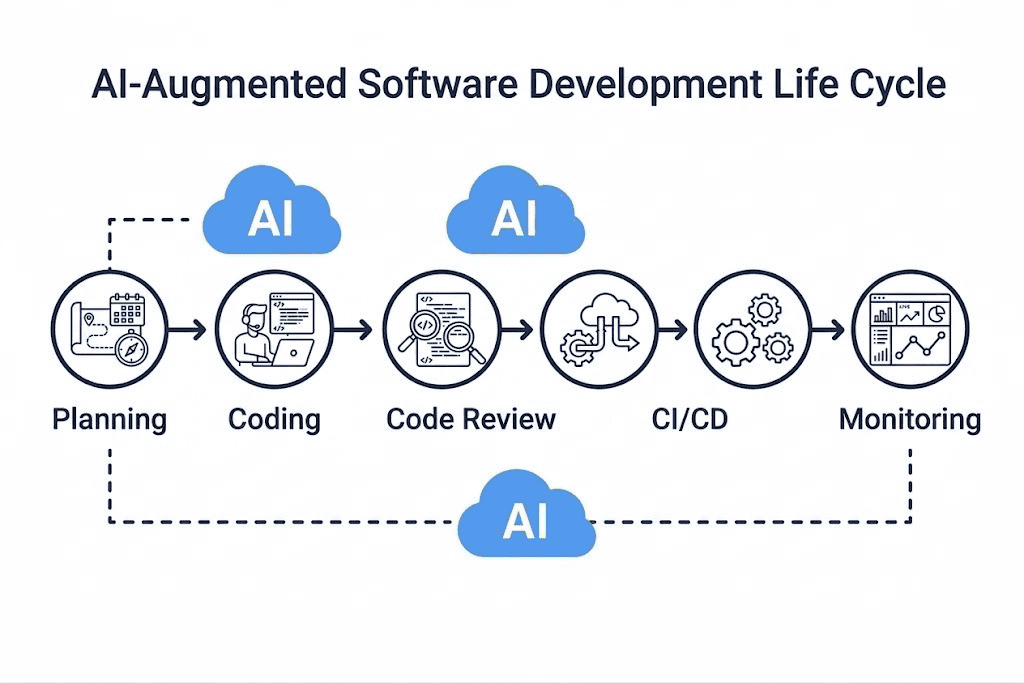
1. Planning
AI can help development and security teams identify potential threats and security requirements based on application architecture, users, data, and business functionality.
For example, teams can use AI-assisted analysis to explore potential attack paths before implementation begins.
2. Coding
AI coding assistants can generate code, explain vulnerabilities, and suggest safer implementation approaches.
Developers should use approved AI tools and avoid exposing:
- API keys
- Passwords
- Customer information
- Confidential source code
- Production data
- Proprietary business information
3. Code Review
AI can review pull requests and identify potentially risky changes. High-risk changes should still receive appropriate human security review.
4. CI/CD
AI can work alongside:
- SAST
- SCA
- Secret scanning
- Container scanning
- IaC scanning
- Automated security tests
- Dependency checks
This allows security controls to become part of the normal development pipeline.
5. Deployment
Security checks can be used as deployment gates based on the organization's risk requirements. Critical security findings can prevent releases until they are investigated or remediated.
6. Monitoring
After deployment, AI can help identify unusual behavior, suspicious requests, data-access patterns, and abnormal activity involving AI agents and APIs.
AI-Powered Development Security Use Cases
Organizations can apply AI-powered security across key stages of the software development lifecycle.
1: Secure Code Generation
AI can help developers generate code faster while security checks remain part of the workflow.
A typical process is:
AI-generated code → Code review → SAST/SCA → Security testing → Human approval → Deployment.
2: Automated Pull Request Security Review
AI can review pull requests and highlight potentially risky code changes.
It can explain the affected component, security risk, and recommended testing, helping teams focus on high-risk changes.
3: Vulnerability Prioritization
AI can analyze large volumes of security findings and help prioritize them based on application context and business impact.
This allows security teams to focus on the vulnerabilities that require the most attention.
4: AI-Agent Security
AI agents interacting with databases, APIs, cloud services, or internal systems require strong access controls.
Key controls include least privilege, authentication, authorization, input/output validation, logging, and monitoring.
5: RAG Application Security
RAG applications must protect the enterprise data they retrieve and process.
Security should address access control, data isolation, prompt injection, sensitive data exposure, document poisoning, and output validation.
What Are the Risks of Using AI for Software Development?
AI-assisted development can improve productivity, but it also introduces new security and privacy risks. Organizations should combine AI with security controls, testing, and human oversight.
1. Vulnerable AI-Generated Code
AI-generated code may contain security weaknesses such as insecure dependencies, weak authentication, poor input validation, or authorization flaws. Developers should review and test AI-generated code before using it in production.
2. Sensitive Data Exposure
Developers may unintentionally share sensitive information with unauthorized AI tools, including:
- Credentials and API keys
- Customer or confidential data
- Proprietary source code
- Internal documents
Organizations should define clear policies for approved AI tools and the types of information developers can submit.
3. Prompt Injection
Prompt injection occurs when malicious or untrusted input attempts to manipulate an AI system's behavior. This is particularly important for RAG applications and AI agents that process external content or interact with tools.
4. Excessive AI Permissions
AI agents with unnecessary access to production databases, APIs, files, or cloud resources can create significant security risks. Organizations should follow the principle of least privilege and provide only the permissions required for the intended task.
5. AI and Software Supply-Chain Risks
AI applications often rely on multiple third-party components, such as:
- Open-source packages and libraries
- AI models and APIs
- Plugins and third-party services
- External datasets
Organizations should maintain visibility into these components and regularly assess their security risks.
6. Incorrect AI Security Advice
AI can miss vulnerabilities or recommend ineffective or unsafe fixes. Security recommendations should therefore be validated through testing, established security controls, and human expertise.
How Can Companies Implement AI-Powered Application Security?
Organizations do not need to rebuild their entire development environment to start using AI-powered application security. A phased approach can reduce implementation risk.
Step 1: Identify AI Use Cases
Create an inventory of where AI is being used.
This may include:
- AI coding assistants
- Chatbots
- RAG applications
- AI agents
- Generative AI applications
- AI APIs
- Machine-learning models
Each use case should have an appropriate security strategy.
Step 2: Protect Sensitive Data
Establish policies for how developers and applications can handle sensitive information.
Organizations should consider:
- Data classification
- Access controls
- Approved AI tools
- Data-loss prevention
- Secrets management
- Encryption
Step 3: Secure the Development Pipeline
Integrate security into existing CI/CD workflows.
A modern pipeline may include:
Code → SAST → SCA → Secret Scanning → IaC Scanning → Container Scanning → Security Testing → Deployment
AI can assist with analysis and prioritization throughout this process.
Step 4: Apply Least-Privilege Access
AI agents should receive only the permissions necessary for their tasks.
For example, an agent that summarizes application logs should not automatically have permission to modify production infrastructure.
Step 5: Test AI-Specific Risks
AI applications should be tested for risks such as:
- Prompt injection
- Sensitive data leakage
- Unsafe outputs
- Excessive agency
- Data poisoning
- RAG weaknesses
- Insecure tool usage
Step 6: Monitor Continuously
Security does not end after deployment.
Organizations should monitor:
- AI interactions
- API activity
- Tool calls
- Data access
- Application behavior
- Authentication events
- Security alerts
- Unusual AI-agent activity
Monitoring helps organizations detect and respond to emerging threats.
What is the Role of AI in Secure Software Development?
AI can enhance secure software development through code review, vulnerability detection, testing, and security analysis.
It should enhance not replace established security practices and human oversight.
Organizations should continue using secure architecture, threat modeling, access controls, encryption, security testing, logging, and monitoring.
The goal is human-led security enhanced by AI, not an AI-only security process.
AI Code Security: A Practical Development Workflow
A secure AI-assisted development workflow should apply security checks from the moment code is generated until it reaches production.
1. Generate Securely
Use an organization-approved AI coding assistant and avoid entering credentials, customer data, or confidential source code into unauthorized tools.
2. Review the Generated Code
Check AI-generated code for insecure logic, hardcoded secrets, vulnerable dependencies, improper authentication, authorization issues, and unexpected behavior.
3. Run Automated Security Scans
Use security tools such as SAST, SCA, secret scanning, container scanning, and IaC scanning to identify vulnerabilities before code moves forward.
4. Test the Application
Run functional and security tests to verify that the code behaves as expected and does not introduce exploitable weaknesses.
5. Apply Human Review
Require developer or security-team approval for high-risk, security-sensitive, or business-critical changes. AI recommendations should be validated before implementation.
6. Deploy Through Secure CI/CD
Move approved code through a controlled CI/CD pipeline with appropriate security gates, access controls, and deployment policies.
7. Monitor in Production
Monitor application activity, infrastructure, APIs, security events, and AI-related activity to identify unusual behavior or emerging threats.
8. Learn and Improve
Use security findings and incidents to improve coding standards, AI usage policies, security tests, developer training, and security controls.
The result is a development process where AI improves productivity without removing the security checks needed to protect applications and business data.
How Can Organizations Manage Shadow AI?
Shadow AI occurs when employees use AI tools without formal approval or security oversight.
Organizations should enable safe AI adoption by defining clear usage and data-protection policies.
These policies should cover:
- Approved AI tools and vendors
- Data-handling and access rules
- Security and compliance requirements
- Monitoring and employee responsibilities
The goal is not to block AI, but to enable productive use while protecting business and customer data.
Why Human Oversight is Still Important
AI can analyze large amounts of information quickly, but security decisions often require business context and engineering judgment.
For example, an AI model may identify a potentially vulnerable function but may not understand:
- Whether the function is exposed externally
- What business process it supports
- What data it can access
- Whether the vulnerability is exploitable in the organization's environment
- What impact a remediation could have on production
Human security and engineering teams provide this context.
The strongest approach is therefore: AI automation + security tooling + engineering expertise + human decision-making
rather than AI operating independently.
How WOWinfotech Can Help in AI-Powered Development Security
AI-powered development security requires security to be built into the development lifecycle, not added later.
WOWinfotech helps businesses develop and secure AI applications, software, and AI-powered solutions.
Our expertise includes:
- AI app development and architecture
- Secure software development and DevSecOps
- Application and cloud security
- Security testing and CI/CD automation
- AI-agent and RAG application security
- Compliance with DPDP Act and GDPR
Whether you are adopting AI coding tools or building enterprise AI solutions, WOWinfotech can help you integrate security from development to deployment.
Build Security Into Your AI Development Lifecycle
AI can accelerate software development, but without appropriate security controls, faster development can also mean faster risk.
WOWinfotech can help you assess and strengthen security across your AI and software development lifecycle from architecture and development to testing, deployment, and continuous monitoring.
Want to identify security gaps in your AI development workflow?
Talk to WOWinfotech about an AI Development Security Assessment aligned to your technology stack, development workflow, and security requirements.
Conclusion
AI is changing how software is built, tested, and secured. AI-powered development security helps teams detect vulnerabilities earlier, automate security checks, improve code review, and respond to risks faster. However, AI-generated code is not automatically secure. Organizations still need secure coding practices, automated testing, access controls, dependency management, human review, and continuous monitoring.
The right approach is to use AI as part of a broader AI-powered application security strategy not as a replacement for established security practices. By combining AI with DevSecOps and strong security controls, businesses can build software that is both faster to develop and safer to operate.
Frequently Asked Questions
-

Team WOWinfotech
WOWinfotechSep 08,2026