ERP Software for Fertilizer and Seed Distribution Companies
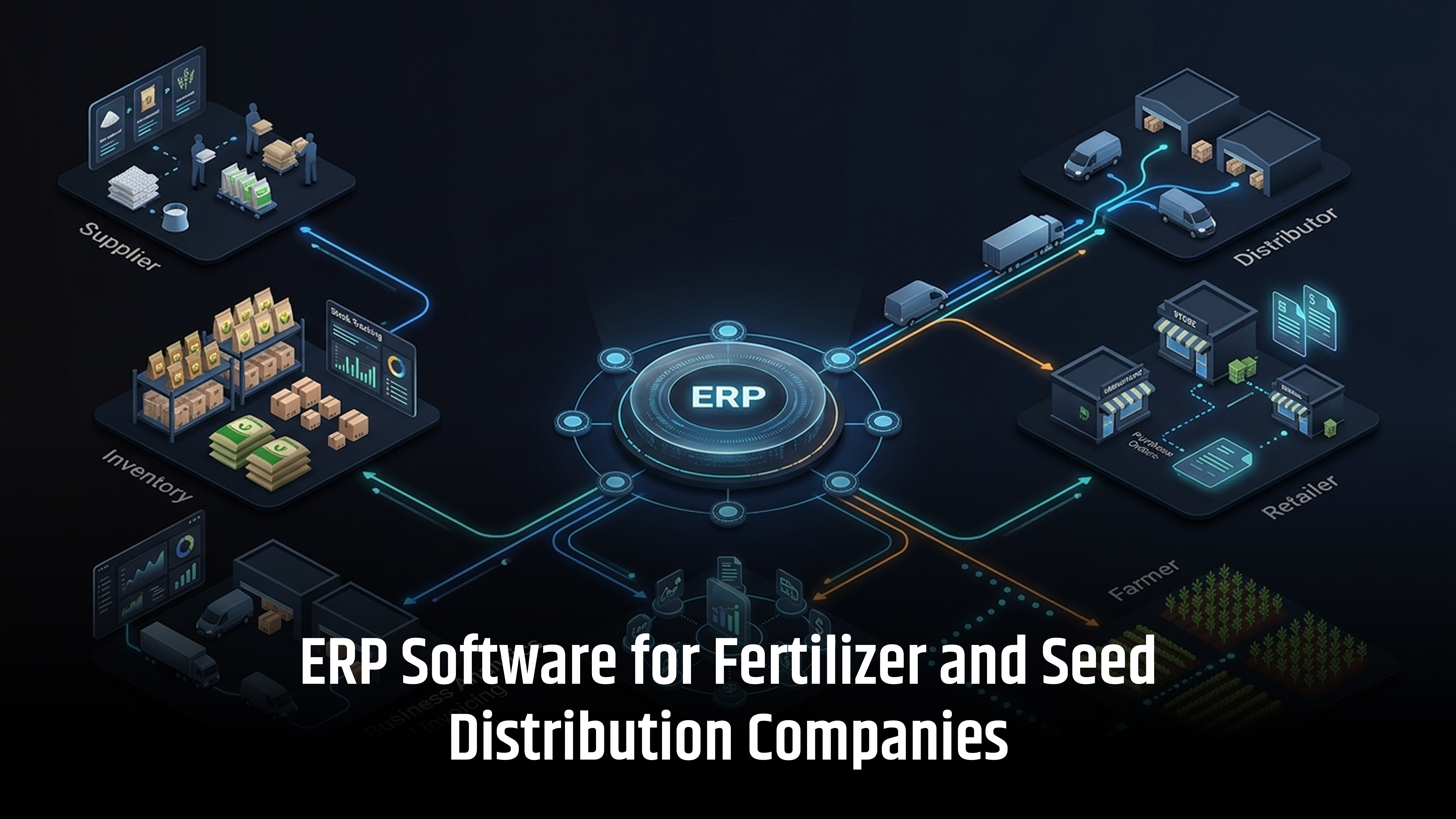
What happens when a fertilizer or seed distributor cannot track stock quickly? What if a seed lot cannot be traced? What if a dealer has overdue payments? These problems can affect sales, inventory, compliance, and customer service.
This is where ERP Software for Fertilizer and Seed Distribution Companies can help. An ERP connects key business operations in one system.
These include inventory management, batch tracking, lot tracking, dealer management, purchasing, warehouse management, sales, GST billing, dispatch, accounting, and reporting.
An experienced ERP software development company can also build workflows around specific business needs, including fertilizer grades, seed varieties, dealer networks, warehouses, and product traceability.
A good ERP creates one connected process. It links suppliers, warehouses, distributors, dealers, retailers, and farmers. This gives businesses better control over daily operations.
Why Do Fertilizer and Seed Distribution Companies Need ERP Software?
Fertilizer and seed distributors manage many daily tasks. They handle warehouses, dealers, products, batches, seed lots, orders, and payments. Seasonal demand adds more work.
Manual systems make tracking difficult. ERP software development services keep all data in one system.
With ERP, businesses can check:
- Stock by warehouse
- Batch and lot movement
- Dealer outstanding
- Pending orders
ERP also improves inventory control, dealer management, product traceability, and financial reporting. It gives teams faster access to accurate business data.
Current Digital Changes in India's Fertilizer and Seed Supply Chain
India’s fertilizer and seed supply chains are becoming more digital. ERP software helps distributors manage inventory, sales, traceability, and compliance data.
Fertilizer Distribution and iFMS
iFMS supports digital tracking of fertilizer stock, movement, sales, and subsidy-related activities. ERP helps businesses manage their internal data, including:
- Stock and product movement
- Dealer and retail sales
- Inventory records
- Financial data
ERP complements iFMS, it does not replace it.
Seed Traceability and SATHI
SATHI supports digital seed traceability and inventory management. A seed ERP can connect:
- Crop and variety
- Seed lot and certification
- Warehouse stock
- Dealer dispatch
- Product traceability
This improves inventory control, quality management, and seed traceability.
Features of ERP Software for Fertilizer and Seed Distribution Companies
ERP software provides essential tools to manage inventory, batches, dealers, sales, warehouses, traceability, accounting, and distribution in one system.
1. Batch and Lot Tracking
Batch and lot tracking helps companies trace products through the supply chain. It is especially important for seed varieties and quality management.
- Forward traceability: Lot → Warehouse → Dealer → Customer
- Backward traceability: Customer → Invoice → Warehouse → Lot → Supplier
2. Seed Variety Management
Seed companies manage many crops, varieties, and hybrids. ERP keeps these details organized in one product master.
- Crop, variety, hybrid, and pack size
- Lot and certification details
- Season, region, and quality records
3. Fertilizer Product and Grade Management
ERP helps manage different fertilizer products and grades. It also stores important product and pricing details.
- Grade, nutrient composition, and pack size
- Batch, cost, MRP, and selling price
- Tax, supplier, and quality details
4. Purchase Management
ERP connects purchasing with inventory and accounts. This gives teams better control over procurement.
- Purchase orders and goods receipts
- Supplier rates and delivery status
- Purchase returns and supplier payments
Purchase Order → Goods Receipt → Stock → Supplier Invoice → Payment
5. Dealer Management
ERP keeps dealer information in one place. It helps sales teams manage orders, payments, and dealer relationships.
- Dealer details, GSTIN, and territory
- Sales history and order history
- Credit limits and payment terms
6. Dealer Credit and Outstanding Management
ERP gives a clear view of dealer payments. It helps control credit before confirming new orders.
- Credit limits and overdue invoices
- Dealer outstanding and payment history
- Credit approval for high-value orders
7. Sales Order Management
ERP manages orders from entry to dispatch. It also checks stock before order confirmation.
- Dealer orders and stock allocation
- Sales approval and invoicing
- Dispatch and delivery status
Order → Stock Check → Invoice → Dispatch → Delivery
8. Warehouse Management
ERP helps manage daily warehouse activities. It gives teams better control over stock movement.
- Goods receipt, picking, and dispatch
- Stock transfers and physical counts
- Damaged and returned stock
9. Stock Transfer Between Warehouses
ERP records every movement between warehouses. This keeps stock balances accurate at each location.
- Source and destination warehouse
- Product, batch, lot, and quantity
- Dispatch, receipt, and transfer status
10. Sales Representative and Field Force Management
ERP connects field sales activities with business data. Managers can track sales and dealer activity by territory.
- Dealer visits and orders
- Sales targets and achievements
- Territory and product-wise sales
11. GST Billing and E-Invoicing
ERP connects sales with GST billing and accounting. It can support applicable GST and e-invoicing processes.
- GSTIN, HSN, CGST, SGST, and IGST
- Tax invoices, credit notes, and debit notes
- E-invoicing and related records
12. Accounts and Financial Management
ERP connects sales, inventory, purchasing, and accounting. This gives finance teams a complete transaction trail.
- Accounts receivable and payable
- Dealer and supplier outstanding
- Profit and loss, cash flow, and tax reports
13. Returns and Replacement Management
ERP records product returns against the original transaction. It also updates inventory correctly.
- Damaged, excess, or wrong products
- Batch and lot-wise returns
- Replacement and return approvals
14. Traceability and Recall Management
ERP helps identify where a product came from and where it was sent. This supports quality investigations and recall processes.
- Lot or batch history
- Dealer and invoice mapping
- Returns and complaint records
15. Reports and Business Intelligence
ERP provides reports from a central database. Managers can use these reports to monitor sales, stock, finance, and distribution.
- Sales: Product, dealer, territory, and season-wise reports
- Inventory: Warehouse, batch, lot, and ageing reports
- Finance: Outstanding, profitability, and cash-flow reports
- Distribution: Order, dispatch, delivery, and transfer reports
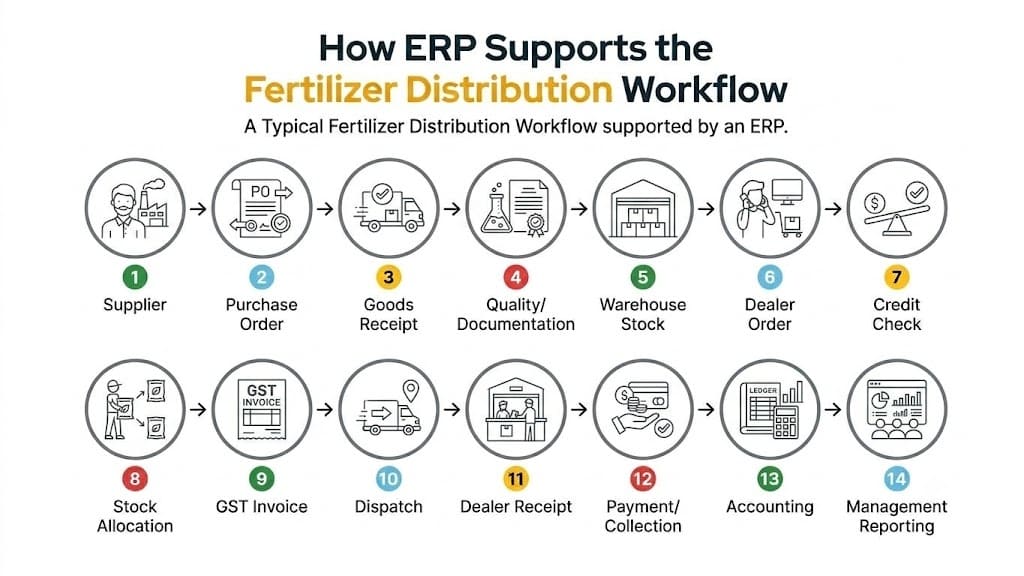
How ERP Supports the Fertilizer and Seed Distribution Process
ERP connects the complete distribution process in one system. It helps teams manage purchasing, inventory, warehouses, dealers, sales, dispatch, finance, and reporting.
|
Business Stage |
How ERP Supports It |
|
Procurement |
Creates purchase orders and tracks supplier deliveries. |
|
Inventory |
Shows current stock by product, warehouse, batch, and lot. |
|
Quality Control |
Stores quality checks, test reports, and certificates. |
|
Warehouse |
Tracks stock receipts, storage, picking, transfers, and dispatch. |
|
Dealer Management |
Stores dealer details, credit limits, orders, and payment history. |
|
Sales |
Manages sales orders, stock availability, invoices, and order status. |
|
Field Sales |
Tracks dealer visits, sales orders, targets, and territory performance. |
|
Dispatch |
Records dispatch details, transport information, and delivery status. |
|
Returns |
Manages returned products, damaged stock, replacements, and approvals. |
|
Finance |
Tracks invoices, payments, receivables, payables, and GST records. |
|
Reporting |
Provides reports on sales, stock, outstanding payments, and profitability. |
ERP brings these activities into one system. This gives teams better control over stock, orders, dealers, product movement, and financial data.
How ERP Supports the Seed Distribution Workflow
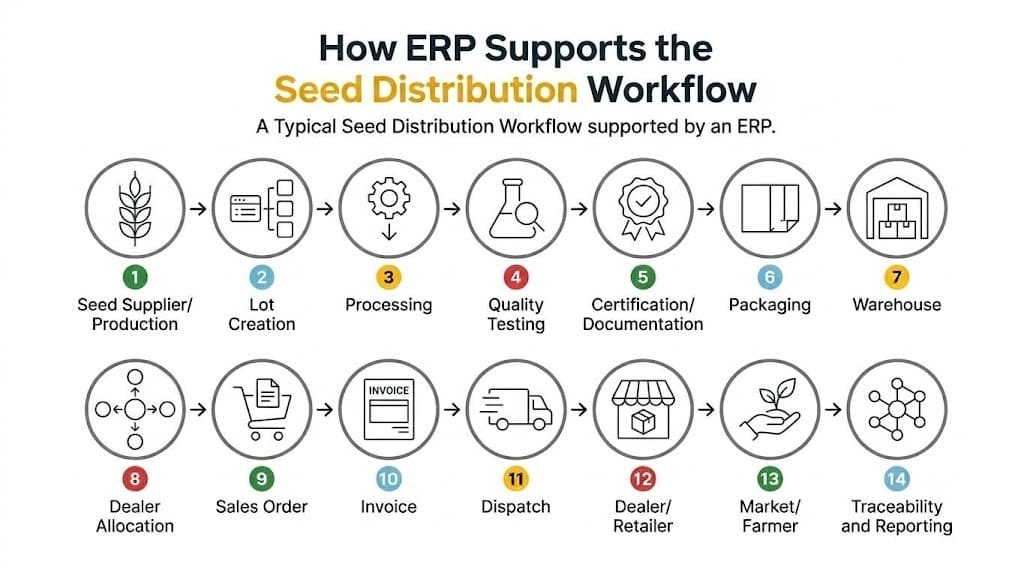
The ERP should preserve the relationship between the product, variety, lot and transaction throughout the process.
Benefits of ERP Software for Fertilizer and Seed Distribution Companies
ERP software helps fertilizer and seed distributors improve inventory control, traceability, dealer management, sales, and overall operational efficiency.
- Better Inventory Control: Track stock by warehouse, product, batch, and lot.
- Fewer Manual Errors: Connect sales, inventory, purchasing, and accounts.
- Better Dealer Management: Track orders, credit, payments, and outstanding amounts.
- Product Traceability: Track batches and lots from purchase to customer.
- Faster Reporting: Get sales, stock, finance, and dealer reports quickly.
- Better Seasonal Planning: Use sales and stock data for purchase planning.
- Financial Control: Track receivables, payables, payments, and inventory value.
- Better Compliance: Maintain GST, invoices, quality, and certification records.
What Should an ERP Dashboard Show?
A management dashboard for a fertilizer or seed distributor can include:
Sales
- Today's sales
- Monthly sales
- Seasonal sales
- Sales by territory
- Sales by product
Inventory
- Total inventory value
- Warehouse stock
- Batch stock
- Lot stock
- Slow-moving products
- Stock below reorder level
Receivables
- Total outstanding
- Overdue amount
- Top overdue dealers
- Collection achieved
Orders
- Pending orders
- Orders awaiting approval
- Orders awaiting dispatch
- Delivered orders
Distribution
- Dispatches today
- In-transit shipments
- Warehouse transfers
- Dealer allocations
The dashboard should show information that managers actually use for decisions rather than displaying a large number of unrelated charts.
Role of AI in Agriculture ERP in 2026
AI is making agriculture ERP software smarter and easier to use. It can help fertilizer and seed distributors analyze data, identify trends, and make faster business decisions.
AI use cases include:
- Sales Forecasting: Predict future sales using historical data.
- Demand Planning: Identify changes in seasonal product demand.
- Inventory Analysis: Find slow-moving and excess stock.
- Payment Risk Alerts: Identify dealers with potential payment delays.
- Invoice Data Extraction: Extract data from invoices automatically.
- Purchase Recommendations: Suggest products that may need replenishment.
- Report Summaries: Convert complex reports into simple insights.
- Duplicate Detection: Identify duplicate customers, dealers, or records.
- Natural-Language Queries: Ask questions about sales, stock, or dealers in simple language.
What Data Should Be Connected in an Agriculture ERP?
A strong agriculture ERP system connects related business data. This creates better visibility across procurement, inventory, sales, distribution, and traceability.
|
Business Area |
Data That Should Be Connected |
|
General Products |
Product → Category → Batch/Lot → Warehouse → Supplier → Dealer → Sales Order → Invoice → Dispatch → Payment |
|
Seed Management |
Seed → Crop → Variety → Lot → Certification → Quality Information → Packaging → Warehouse → Dealer → Invoice → Traceability |
|
Fertilizer Management |
Fertilizer → Grade → Batch → Quality Information → Warehouse → Dealer → Invoice → Dispatch → Sales/DBT Records |
This connected data structure helps businesses manage inventory, traceability, sales, and distribution from one ERP system.
Conclusion
ERP software for fertilizer and seed distribution companies connects inventory, warehouses, dealers, sales, dispatch, and accounting in one system. It helps improve stock control, product traceability, dealer management, and business reporting.
For seed businesses, ERP can manage varieties, lots, quality, and certification. For fertilizer businesses, it can manage batches, grades, stock, and distribution.
WOWinfotech develops customized agriculture ERP software based on your business needs. Build a smarter, scalable, and connected distribution system with WOWinfotech.
Contact WOWinfotech today to discuss your ERP development requirements.
Frequently Asked Questions
-

Team WOWinfotech
WOWinfotechOct 05,2026